I am a data-driven person. I know many data-driven people (would you like that statement graphed in a chart or analyzed in a table?). But I often find myself with mere minutes to answer a question that would take significant time investment to answer. Wouldn’t it be great if we could just retrieve the raw data, describe the analysis we want, and get an answer or chart without having to dive into esoteric platforms or code?
That, my friends, is the very essence of chatting with data. By connecting a dataset (or preferably multiple related datasets) with a generative AI chat interface, we can ask questions in a natural language format that would be accessible to project managers, business analysts, health data managers, and marketers.
Audience: Non-coders (or coders with no time) who understand their data, but who do not want to dive into code to answer their questions.
I am very intrigued by AI personas and the ability to shape the output created by ChatGPT and other generative AI platforms. But with the ability to generate so much content in the blink of an eye, how can we tell if the content is any good?
My son has been complaining that he needs something to help him stay focused in school, and most of the fidgets on the market aren’t allowed by his school. I have a side business creating personalized gifts, so I am the proud owner of two laser cutters, two 3D printers, and plenty of know-how. I decided it’s time to fire up the at-home makerspace!
One of my sons tends to chew on his cloth mask, so I modified a 3D printed surgical mask so he can no longer physically get the cloth mask into his mouth. Since creating this plastic mask, he has worn masks for therapy and in the community as needed with almost no fuss. Masking during COVID-19 went from major stress to no big deal! His school team asked me to make some plastic masks for some of the other special needs kids at the school, and they had similar success as well.
3D printed mask goes underneath the cloth mask to keep it away from the mouth
Elastic ear loop size can be changed with the adjuster on the end
Padding on the edge to increase comfort
Grill on the front provides air flow but prevents the cloth mask from being pushed into the mouth
So if you have a child who likes to chew on their cloth mask, this might be a major help. If you have access to a 3D printer, you can find STLs and assembly instructions on GitHub. It’s a 3-4 hour print on my Prusa MINI. depending on the size of the mask you need. I also included Amazon links to purchase the padding, elastic, and ear loop sizing supplies.
What do you do when you have a week of vacation with built-in grandparent babysitting? You make a Star Wars video game, of course! The vast majority of this game was created during a one week coding blitz. I’ve done a lot of minor tweaking due to observations and bugs found while playing the game with my son, but about 90% of it was written in that one week. This game was actually originally created as a card and dice fleet battle game that I made months ago. I thought it would be fun to port it over to the computer.
Basically, you tap one of your ships and then tap one of the mission icons that show your available actions.
Attack – basic blaster attack. Each ship has different attack ranges for attacking fighters or capital ships.
Strafe – a fighter can fly underneath the shields of a capital ship to cause direct damage to the hull. Or the fighter might get blasted by the capital ship while it attempts this mission.
Attack Shields – a fighter can heavily damage the shields of a capital ship. Or it might get blasted by the capital ship.
Attack Guns – a fighter can destroy a capital ship’s ability to shoot other capital ships. Or it might get blasted by the capital ship.
Heal Self – a capital ship can repair damage to its hull.
Heal Shields – a capital ship can repair damage to its shields.
Repair Guns – a capital ship can repair damage to its guns that attack other capital ships.
There are four different AI characters you can play against, each with its own strategy. Sergeant Niles is pretty easy to defeat. Admiral Skeedl will surprise you sometimes!
The game also supports player-vs-player battles at the same computer. I didn’t bother to create an online multiplayer component for this game since my son and I just battled each other in-person. In a player-vs-player battle, you can select from a wider range of avatars for your player.
The Tech Side
This game was built with the Phaser 3 JavaScript and HTML5 game development framework, and I used the Webpack asset bundler and Babel to enable developing with newer features of JavaScript. The game is served with a simple NodeJS server app. This is my default setup for quick online games. When I made my last game, A-MAZE-ing!, I created a template full of the best practices I had learned. That came in handy for this one, so I’m going to say the template was worth the effort.
Stats from my original card and dice version
The Star Wars art was taken from various fan sites. The character avatars, sounds effects, and music loops were from various bundles I have accumulated from Humble Bundle over the years. The icons for the interface were from Kenney’s user interface pack.
Behind the scenes, each type of ship has a range of values. You can see what the original cards looked like in this image. The top row is attacking fighters. The second row is attacking capital ships. The third row is repairing the hull. And the fourth row is repairing shields. So you can see that most of the capital ships aren’t very good at attacking fighters. They will miss most of the time. I also incorporated some little details from Star Wars lore. For example, the Mon Calamari MC80 Cruiser is known for having a comparatively weak hull but excellent shields. So you can see that it has a much lower hull value than the Imperial Star Destroyer, but also much higher shields. Also, the MC80 can repair more of its shields per turn than the Imperial Star Destroyer can.
Fighters have additional options, as you saw above in the list of missions. The ability of starfighters to do special and unexpected things to capital ships has been a staple of the Star Wars universe ever since Luke Skywalker destroyed the Death Star in his X-Wing. Or if you remember the giant fleet battle in Return of the Jedi, two tiny A-Wing starfighters destroy the shield generator of the mighty Super Star Destroyer Executor. Then another A-Wing crashes into the bridge, causing major damage. With events like those in mind, I added the ability to fly in under the shields to strafe a capital ship (skipping the shields and causing damage to the hull). I also added the ability to target the shield generators (causing 5 damage if successful) and turbolasers (reducing the capital ship’s ability to damage other capital ships).
But those special fighter missions come with a price. They have a chance to succeed, a chance to miss, and a chance that the capital ship gets to blast the starfighter instead! Watch out! Underneath the hood, the main missions are resolved with the equivalent of a 6-sided dice roll. The special fighter missions have ranges of success and failure using the equivalent of a 20-sided dice roll.
Game Balance
I believe the most interesting aspect on the tech side of this project was how I determined game balance. Obviously I played it many times, and I learned a ton by watching my five-year-old play it without instructions from me. He understood it quickly, but whenever he asked a question or misunderstood something I took that as an opportunity to update the visuals and sound effects to try to make it more obvious what happened. He also found a lot of tiny bugs I never would have found. For instance, he discovered that you could click on the attack icon a bunch of times really fast and launch a ton of blaster bolts at the enemy instead of just one. Oops! Fixed that one at least 🙂
The primary way I determined game balance was through simulations. Underneath the hood, the computer has the ability to simulate complete battles against itself. So I pitted the various artificial intelligences against each other in thousands of mock battles. Then I made tweaks to the battles to make them pretty balanced. My goal was to have each battle be about a 50% chance when two smart players were battling each other. To simulate this, I used my most advanced AI (Admiral Skeedl) playing against himself. When Admiral Skeedl got close to 50/50 over a thousand mock battles, I called it decently balanced.
You can see a screenshot of some of the battle reports in the gallery below.
AI Strategies
I built the different AI characters with a combination of a query language and fuzzy logic.
So, at the low end, Sergeant Niles just queries a random available ship from his side and a random ship from the enemy side. And then he blasts it. That’s it. Totally random. He doesn’t know what he’s doing, so he’s pretty easy to beat.
At the high end, Admiral Skeedl uses personality-weighted fuzzy logic. His AI searches for his preferred mission in each type. He gathers…
The strongest enemy capital ship + the best ship to attack it
The most damaged enemy fighter + the best ship to attack it
The enemy capital ship with the strongest shields + the strongest fighter to attempt an attack run on the shield generator
The enemy capital ship with the strongest shields + the strongest fighter to attempt a strafing run underneath the shields
The ally ship closest to death to attempt a repair
Each of these available choices are then weighted with Admiral Skeedl’s personality. For reference, he really likes to attack capital ships. He doesn’t mind repairing his ships. Everything else is only when the opportunity is too good to pass up. To choose between the available missions, a random number is generated and then the personality weights are added in. The highest total (random number + personality preference) is chosen as for this turn.
My son loves mazes, so naturally I built him a maze game! He actually designed levels 2, 3, and 4. I tweaked them a little bit so that they make a little more sense, but the designs are his alone! We can add more levels to our heart’s content – it’s pretty easy now that everything is setup.
The Tech Side
This game was built with the Phaser 3 JavaScript and HTML5 game development framework, and I used the Webpack asset bundler and Babel to enable developing with newer features of JavaScript. The game is served with a simple NodeJS server app. This is my default setup for quick online games. I actually put in a little extra time to take the best practices from my last few projects and combine them into a template that I can use for future projects. Hopefully it saves me more time than I spent creating the template itself!
The art assets were taken from the free collections by Kenney. Kenney makes a lot of good game art and some nice tools to help non-artists as well. Many thanks, Kenney! The music loops and sound effects are from some asset packs I got a while back through Humble Bundle. They have incredible deals on game assets every once in a while!
The maze levels were created inside a free tilemap editor called Tiled. You can easily “paint” tiles where you want them, and Phaser integrates with it very nicely.
One of my son’s levels
I also stumbled upon a nice free online tool for interacting with sprites. An image atlas is a combination of an image file and a data file (usually JSON). The image file actually contains multiple images all stacked next to each other, and the data file (the atlas) tells Phaser where each smaller image is located within the larger whole. This is a pain to do manually, but the Atlas Packer for Phaser 3 does a lot of the work for you! Nice!
Controlling the character on a computer is pretty simple. W is up, A is left, S is down, and D is right. On a mobile device, you can touch anywhere on the screen and drag your finger like a virtual joystick to make the character move.
Faith-Quest is like a scavenger hunt. Each Quest comes with a series of special codes (called QR codes) that can be scanned by a free app on your phone or tablet. Each code takes you to a part of our website that shows you about the item you found and stores it for you. When you find all of the items in your Quest, you have completed the Quest!
This is like geocaching but it can all be done inside of a house or church. The first quest teaches kids about the Fruit of the Spirit. I’m working on more quests, and I have some ideas to make it far more interactive and engaging. Stay tuned!
The Tech Side
I decided to simply the concept as much as possible. Each QR code takes the user to a special URL for that quest. Once they arrive at the website, I simply used cookies to store their progress on the quest. When all of the QR codes have been scanned, the quest is completed and the user sees a special video at the end. The limitation here is that progress is only tracked by device. You can’t start the quest on your phone and end it on your iPad because the cookies won’t transfer between devices. I could make accounts to store progress more reliably, but I hate creating accounts and I bet you do too!
The website itself is a pretty simple NodeJS server app that actually stores and tracks the user’s progress with cookies. I used a basic Bootstrap website template made by BoostrapMade, and I used EJS for server-side view templates within NodeJS. To keep this prototype simple, I used videos from YouTube for all of the teachings.
In the future, I could integrate mini-games instead of just showing videos. For instance, if I do a Faith-Quest about David, I could have one of the QR codes take the user to a short video game battle with Goliath. When they win the battle, the cookie would be updated to show they had completed that section of the quest.
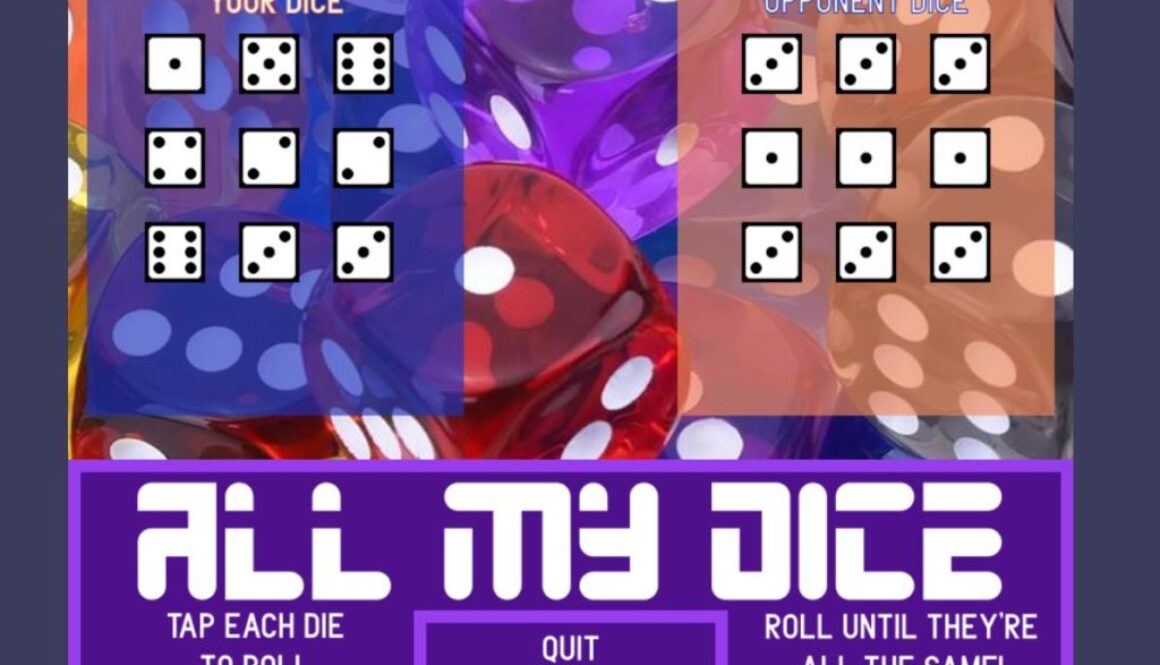
One of my sons loves to play a dice game where you keep rolling until all of your dice are the same value. Since we have family spread around the country, I decided to build it as an online multiplayer game so we could play together. It’s still a work in progress, but it works. Click the image to play it now! If you want to try multiplayer, I would recommend arranging a time to meet someone on there – there aren’t that many random people hanging out waiting for someone to log in and play against them 🙂
The Tech Side
The game itself is built using the Phaser 3 JavaScript and HTML5 game framework. I used Babel so I could use new JavaScript language features on the development side, but it gets translated into older and more compatible JavaScript when I publish the game. I also used the webpack asset bundler. This manages a lot of the rote publishing tasks like minifying the code, importing images and sounds into a final project folder, etc. It also makes development quicker by automatically updating and refreshing the game whenever you make change to the code.
To achieve the multiplayer functionality, I built a NodeJS server app that connects to the clients via SocketIO to enable real-time coordination between the players. The app uses Express to define routes, and it uses EJS for the view templates. It took a little time to get the project switched over from purely single player to a multiplayer client-server architecture, but my son thinks it was worth it!
Several years ago, I was tasked with creating a simple relaxation breathing app so a counselor’s clients could practice at home. At the time, I was using Corona SDK for some game projects, so I whipped the relaxation breathing app together pretty quickly. While this app is not available for download, I decided it would make a very useful demo for learning the React Native framework for building cross-platform apps in JavaScript.
Screenshots
Lessons Learned from React Native
It is very easy to get started with React Native if you’re familiar with JavaScript already (and even more so if you’ve worked with React for a web project already). If you’re only going to make apps on occasion and you’re already using JavaScript regularly, this is an easy way to stand up a new project quickly.
There are definitely some drawbacks, however. I found the documentation to be frustrating relative to other frameworks like Flutter. While there were many available demos, I found it hard to track down details whenever I wanted to do something different from the demos. The stack navigator from React Native 4 was poorly documented – especially how it differed in Native versus the web. I did eventually work out all the kinks and get it working quite nicely.
The overall development process was greatly simplified by using a managed Expo project. It allows live updating of code and greatly simplifies the build experience. Luckily, everything I needed (including the audio-visual components for the guided relaxation audio file) was already included in Expo. Leaving the managed Expo ecosystem requires a bit of work, so I’m glad I didn’t have to go there for this project.
Since I spend a lot of time in the world of web development, the flex layout and CSS-inspired styling options seemed very natural. If you ever get frustrated with the layout options of other mobile frameworks, this one is about as easy as I’ve ever experienced.
One of my most intricate projects (recently shut down) was an artificial intelligence program that identified potential real estate investment opportunities. At a high level, it combed through a particular MLS each day to look for properties that might be under-valued enough to warrant a flip. The parameters used by the application to identify potential investment properties is still proprietary, but I am able to share the technology I built to make it happen every day without any manual intervention needed.
Gathering Data with Selenium
Most MLS do not provide an API or method of exporting data, so the app needed to actually browse the website itself. Selenium is a package for Python that allows the developer to automate web browsing. The realtor showed me how he would manually search for investment properties, and I translated that into an automated web browsing session that captured all of the necessary information. This involved multiple MLS searches, so I had to combine multiple data sets from the MLS for further processing.
Emailing with Mailchimp
Every day, the application sent out a summary email to investors or realtors who had signed up for the service. Rather than trying to create my own email delivery system that could handle all the quirks that come along for the ride, I decided to use Mailchimp as the email delivery service. This provided several benefits. First, it made it pretty easy to manage payments and signups on the user-facing website. I didn’t have to reinvent the wheel with a custom plugin, because Mailchimp already has a plethora of plugins available.
Second, it allowed me to offload the ability to deliver a large amount of emails. With just a few API calls to Mailchimp, my application could set it and forget it. Delivering a single email from an application is easy. Delivering a lot of emails takes way more thought and infrastructure than you might think. I’m happy to let Mailchimp handle that for me.
Automating Everything with AWS
Since the application needed to run every single day, I didn’t want to have to trigger anything manually (and neither did the business owner). But I’m also a frugal type, so I didn’t want to waste the business owner’s money. I eventually landed on an AWS EC2 instance that automatically started itself at a particular time of day, and it suspended itself when its task was complete. The instance was setup to run the program whenever it resumed from sleep UNLESS a “debugging” key was set inside AWS. This allowed me to fire up the instance and check any local logs or issues without running the application itself.
Remote Error Reporting with Sentry
When your application runs in the Cloud, how do you know when something goes wrong? Sentry allows me to log very detailed errors and receive an email notification when they happen. It gathers breadcrumbs along the way, and it only logs them if an error actually happens. So, for instance, I can add extra information to help me track down where in the program flow the error occurred, and that information gets discarded unless something goes wrong. Very slick.
I added an extra layer to this error reporting as well. Since the errors were mostly accounting for changes on the MLS website, I needed to see what the web browser looked like when the error occurred. But for a web browser running automatically in the Cloud, there isn’t a screen to look at. So I used a virtual screen whenever there was an error. In essence, I rendered the current website view to an image and then had the application email me that screenshot for extra information on the error. I can’t tell you how many times that screenshot turned a tricky error trail into an easy fix.
Summary
This was a fun project since it required me to coordinate so many different parts seamlessly. It was mighty satisfying when those daily investment summaries started going out every day without me lifting a finger. And the remote error reporting mechanism allowed me to fix any issues very quickly. It also gave me an excuse to learn a lot more about AWS.




 Gathering Data with Selenium
 Error Reporting with Sentry