I Finally Have My Dream Local AI Stack (and it runs on AMD)
I recently tried to explain to my wife why I was still “setting up my new computer” two months after I got it. As I launched into an explanation of my quixotic quest for a local AI dream machine, I realized she had stopped paying attention after the second sentence. But you, dear reader, are still paying attention and we’re already on the third sentence! This is promising. And now I can rest triumphantly because I have achieved a fully local, fully private, fully mine AI stack running on a single machine. No subscriptions. No data leaving my house without my explicit say-so. No token limits and overages infringing upon my poor defenseless credit card.
Was it worth two months? Reader, it was worth at least four. Well, maybe three and some change. It’s hard to tell with inflation these days.
TL;DR / Executive Summary
- 128GB of unified memory on a Bosgame M5 AI Mini Desktop (a Strix Halo machine) makes running large local models genuinely practical, but AMD’s software ecosystem means you will earn every percentage point of performance
- Lemonade Server is the key piece that makes AMD hardware actually work well for local LLM inference, with day-zero support for Gemma 4
- Two clean connection paths (Lemonade direct for local models, LiteLLM direct for cloud) keeps the stack reliable without forcing everything through one bottleneck
- Everything is accessible from anywhere through Tailscale VPN, with all services firewalled from the public internet
- Zero mandatory subscriptions — cloud models are available through LiteLLM when I genuinely need them, but I rarely do anymore
Who Is This For?
This article is for technically-inclined folks who are tired of paying per-token for things their own hardware could handle. You do not need to be a DevOps engineer. But you do need to be comfortable running terminal commands and not panicking when something does not work the first time. (Or the fifth time. Some painful experiences are etched in my brain forever now.)
If you are an NVIDIA user, some of this will be easier on your time but heavier on your wallet.
The Hardware: A Bosgame M5 AI Mini Desktop With 128GB Unified Memory
Let me explain what I mean by 128GB of “VRAM,” because it is a bit unusual. The Bosgame M5 AI Mini Desktop uses AMD’s Ryzen AI Max+ 395, a unified memory architecture where the CPU and integrated Radeon 8060S GPU share the same pool of LPDDR5X RAM. Configure it with 128GB and the GPU can access all of it. That is the magic trick.
For comparison: a consumer NVIDIA RTX 4090 gives you 24GB of dedicated VRAM. A professional H100 gives you 80GB. I am running 128GB in a mini PC the size of a thick hardback book. After this paragraph I will just call it my Strix Halo box (that is the AMD platform codename, and it is more fun to say than “the Bosgame”).
That changes what is possible. Models that would be completely impractical on typical consumer hardware (large reasoning models, big embedding models, full image generation pipelines) just… fit. Comfortably.
But there are two tradeoffs. First, this is AMD instead of NVIDIA. CUDA has years of ecosystem momentum. ROCm (AMD’s compute platform) has been catching up fast, but “catching up” still means “more friction.” Every piece of software I will describe below required some extra configuration that NVIDIA users largely skip. That is just the honest truth.
The second tradeoff? I am memory rich but compute poor. Well, I’m not compute poor, but maybe compute working class. In slightly more technical terms, the AI Max+ 395 can run big models but it can’t run them quickly. This is why I use mixture-of-experts models, but I’ll explain what that means later.
Methodology: How I Actually Built This
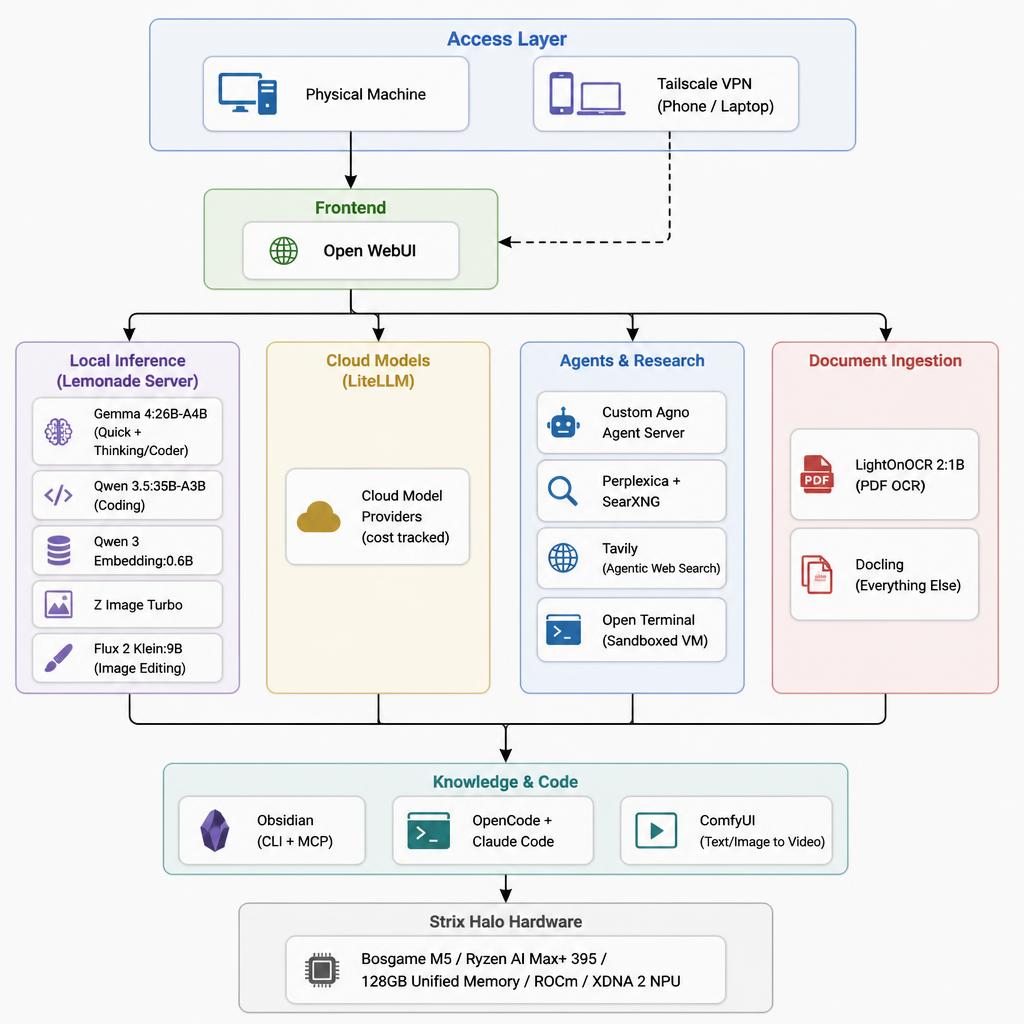
I am not going to pretend I had a clean plan from day one. I built this iteratively, breaking things and fixing them over several weeks. My final setup:
- Hardware: Strix Halo, 128GB unified memory
- OS: Linux (ROCm support on Linux is meaningfully better than Windows for this use case)
- Core inference layer: Lemonade Server (direct connection)
- Cloud aggregation layer: LiteLLM (separate direct connection)
- Frontend: Open WebUI
- Agent framework: Custom Agno agent server
- Research: Perplexica + SearXNG
- Knowledge base: Obsidian with CLI and MCP connector
- Document ingestion: LightOnOCR 2 for PDFs, Docling for everything else
- Image/video generation: ComfyUI plus Lemonade’s image endpoints
- Web access: Tavily (technically paid, but I have not exceeded the free tier yet)
- Networking: Tailscale VPN for remote access
One architectural note worth making explicit: I maintain two separate connection paths. I could theoretically route Lemonade through LiteLLM to create a single unified endpoint. In practice I found that less reliable. So all my systems connect directly to Lemonade for local models and directly to LiteLLM for cloud models. Two clean paths. Less abstraction, more stability.
The Full Stack, Layer by Layer
Layer 1: Local Inference (Lemonade Server)
This is the foundation. Lemonade Server is open-source, provides OpenAI-compatible APIs, and is specifically built to maximize AMD hardware, including ROCm acceleration for Radeon GPUs and XDNA 2 NPU support for Ryzen AI processors. AMD shipped day-zero support for my main model through Lemonade, which tells you something about how seriously they are taking this software.
Lemonade exposes an OpenAI-compatible API endpoint, and every local-model-aware tool in my stack connects to it directly. That API compatibility is genuinely the killer feature. I did not have to patch or fork anything downstream.
The biggest change I made to my stack was moving from Ollama to Lemonade. Ollama with AMD requires a bit of luck, a roll of duct tape, and a willingness to watch things fly off the rails sometimes. I was constantly fiddling with settings when I was running the exact same models on Ollama, and when I switched to Lemonade everything just worked. If you have an AMD system, use Lemonade instead of Ollama! You can thank me later. Or now. I’m good either way
After plenty of experimentation and chasing bigger and denser and supposedly better models, I landed on the following as the intersection between quality and speed on my system:
Gemma 4:26B-A4B is my primary LLM. This is a mixture-of-experts model with 26 billion total parameters but only 4 billion active per token. That means it requires the memory of a 26B model but the compute of a 4B parameter model. For my memory-rich yet compute-working-class setup, this is perfect. I run two variants: a non-thinking version for quick tasks where I just want a fast answer, and a thinking coder-optimized variant for anything involving code or complex reasoning. I will just call it Gemma 4 from here on out.
Qwen 3.5:35B-A3B is worth calling out as another perfectly fine option. It is another MoE model (35B total, 3B active) and I get excellent coding results from it. Sometimes it edges out Gemma 4 on code generation tasks. Having both available locally is a genuine luxury, but I find that Gemma 4 works slightly better for me on most tasks.
Qwen 3 Embedding:0.6B handles all my embedding needs. It is fast, effective, and (this is the key finding) I did not see meaningfully better retrieval results when I tested the 4B variant. So I stuck with the smaller model. Faster and just as good for my use cases. The right call is usually the boring call.
Z Image Turbo handles quick local image generation for drafts and iteration.
Flux 2 Klein:9B handles image editing. I will just call it Flux 2 going forward. The Klein variant is the 9B parameter version, lighter than the full Flux 2 model, and it runs comfortably alongside everything else in my 128GB pool.
Layer 2: Document Ingestion (LightOnOCR 2 + Docling)
This is a layer most people skip describing, but it matters a lot for RAG pipelines and knowledge management.
LightOnOCR 2:1B handles PDF OCR. It is a 1B parameter model (tiny, fast, and surprisingly accurate on the kinds of PDFs I throw at it). For everything else (Word documents, HTML, structured text, mixed formats) I use Docling, which handles parsing and chunking cleanly.
Between the two, I have a reliable ingestion path for essentially any document format I encounter.
Layer 3: Cloud Escape Hatch (LiteLLM)
I am not a local-AI absolutist. Sometimes a task genuinely benefits from a frontier model. LiteLLM aggregates my cloud providers into a single OpenAI-compatible API surface. It also tracks costs, which is the feature that keeps me honest about when I am actually paying versus when I am freeloading off my local hardware (while looking smugly superior when my friends tell me their monthly AI bills, of course).
As noted above: this is a separate connection from Lemonade, not a layer stacked on top of it. When Open WebUI or an agent needs a local model, it goes directly to Lemonade. When it needs a cloud model, it proxies through LiteLLM. Keeping those paths clean eliminated a category of intermittent failures I was seeing when I tried to run Lemonade through LiteLLM. I had to settle for the practical victory of two point-to-point connections instead of one, but two is way better than five.
Layer 4: The Front Door (Open WebUI)
Open WebUI is my daily driver interface. Every model (local or cloud) shows up here. Every agent is accessible here. I can trigger workflows, start research tasks, generate images, and chat with documents, all from one browser tab. One interface to rule them all. Sauron would be proud.
Layer 5: Agents and Research (Agno + Perplexica + Tavily)
This is where the stack gets more capable. I have three research and agent pathways:
- Tavily for quick agentic web search, which returns synthesized answers rather than just links. I’m still on the free tier (though I’m nervous about incurring cost each month because I’m a cheapskate).
- Perplexica + SearXNG for deeper research I want kept entirely private and self-hosted. I have a Perplexity Pro account for a few more months, but courtesy of Perplexica I’m not going to keep my paid account.
- Custom Agno agent server for complex multi-step workflows involving tool use, memory, and branching logic.
The Agno agents can reach out to any other service in the stack: running code in Open Terminal, querying Obsidian, generating images via Lemonade, or escalating to a cloud model via LiteLLM when the task warrants it.
Layer 6: Persistent Knowledge (Obsidian)
My Obsidian vault is my long-term memory layer. I have both a CLI connector and an MCP (Model Context Protocol) connector, so agents can read from and write to my notes programmatically. Research summaries get filed automatically. Relevant past notes surface during conversations. The system feels intelligent over time rather than stateless.
This is the piece many people skip, and it makes the biggest difference in daily use. Self-improving AI systems might take over the world some day, but until then they are quite handy.
Layer 7: Video and Advanced Image Generation (ComfyUI)
Text-to-video and image-to-video live in ComfyUI. It is not the most beginner-friendly tool on this list (the node-based interface has a learning curve I would charitably describe as “vertical”). But 128GB of unified memory means I can run video generation workflows that would simply OOM on typical consumer hardware. And since Lemonade doesn’t have video support yet, I can’t move everything away from ComfyUI.
But if Lemonade every supports a video generation API, watch your back ComfyUI. The architecture scalpel is coming for you!
Layer 8: The Glue (Tailscale + Firewall Rules)
Here’s my security architecture in plain English: all services are firewalled. The only two ways to reach them are sitting at my physical machine or connecting through Tailscale VPN. That is it. I didn’t do a penetration test or anything like that, but I did at least test the firewall from other devices to let the anxious corner of my brain sleep somewhat more soundly.
The practical upside is that I can pull up Open WebUI on my phone or spare laptop from anywhere and have full access to my entire local stack. The latency is slightly higher than sitting at my desk, but the capability is identical. I am carrying 128GB of unified memory in my pocket. (Technically my home is carrying it. And technically it’s in my basement, so it’s under my home at that. Details.)
Bonus Layer: OpenCode + Claude Code Integration
Custom scripts route local Lemonade models and LiteLLM cloud models into OpenCode and Claude Code as needed. This means I get AI-assisted coding without paying for separate subscriptions to coding-specific tools. Gemma 4’s thinking coder variant and Qwen 3.5 handle most tasks well enough that I rarely feel the need to reach for a cloud model here.
For example, here’s the script I use to launch Claude Code with Gemma 4 (without a Claude Code subscription).
# Set environment variables for OpenRouter integration with Claude Code
export LEMONADE_API_KEY="YOUR-KEY"
export CUSTOM_MODEL="user.Gemma-4-26B-A4B-ThinkingCoder"

# Output a message telling the user which model is being used
echo "Using model: $CUSTOM_MODEL"

# Launch Claude Code with the custom model
lemonade launch claude --model "$CUSTOM_MODEL"
I have a script like this for each model (local via Lemonade or cloud via LiteLLM) I want to use within Claude Code or OpenCode. I just run claude-lemonade-gemma or claude-litellm-kimi from my terminal and voila!
What This Actually Cost Me
Hardware: The Bosgame M5 with 128GB is a premium device. I got it on super sale, but it was still the most expensive computer I have ever purchased. It’s half the cost of the NVIDIA DGX Spark for the same amount of VRAM, so you can decide the relative value of the money in your wallet versus the time spent making an AMD machine work.
Software: Almost entirely free and open source (Lemonade, Open WebUI, LiteLLM, Perplexica, SearXNG, ComfyUI, Agno, Docling, Obsidian for personal use, Tailscale for personal use free tier).
Cloud models via LiteLLM: Pay-as-you-go. Genuinely minimal now that local inference handles most tasks.
Tavily: Technically a paid account, but I’m still squeaking in beneath the monthly free quota each month.
Time: Two months at an hour or two per day. I implore you to not add up all those hours. And don’t tell my wife, either.
Verdict
This setup was impossible until very recently. The combination of 128GB unified memory on the Strix Halo, Lemonade’s AMD-native inference with day-zero model support, and a well-integrated open-source toolchain has crossed a threshold where local AI is genuinely competitive with cloud AI for most of my daily workflows.
The AMD versus NVIDIA tradeoffs are real. AMD taxes your time whereas NVIDIA taxes your wallet. But ditching Ollama for Lemonade was like the clouds parting and sunshine beaming down from heaven. The two-connection architecture (Lemonade direct for local, LiteLLM direct for cloud) was a hard-won lesson in preferring reliability over elegance. A younger version of me would have kept fighting to get down to a single connection, but I am either wiser now or just more tired.
For the security-conscious readers, I highly recommend Tailscale and Open Terminal. Tailscale allows reliable and secure connections to all your devices, and Open Terminal unleashes AI powers on the command line and file system while bottling it up inside a container. The combined security benefits allowed me to create capabilities that moved from “impressive toy” to “actually changes how I work.”
If you are evaluating whether to go deep on local AI infrastructure, the honest answer in 2026 is: the hardware and software are finally good enough. The question is whether you have the patience for the setup. I did. Mostly.
Bonus Info: Local vs Cloud Image Comparison
I strive for honesty, and I have to honestly admit that cloud image models are noticeably better than local models when you really care about the details. And if you want accurate text rendering, OpenAI’s new GPT Image 2 is worlds better than anything else.
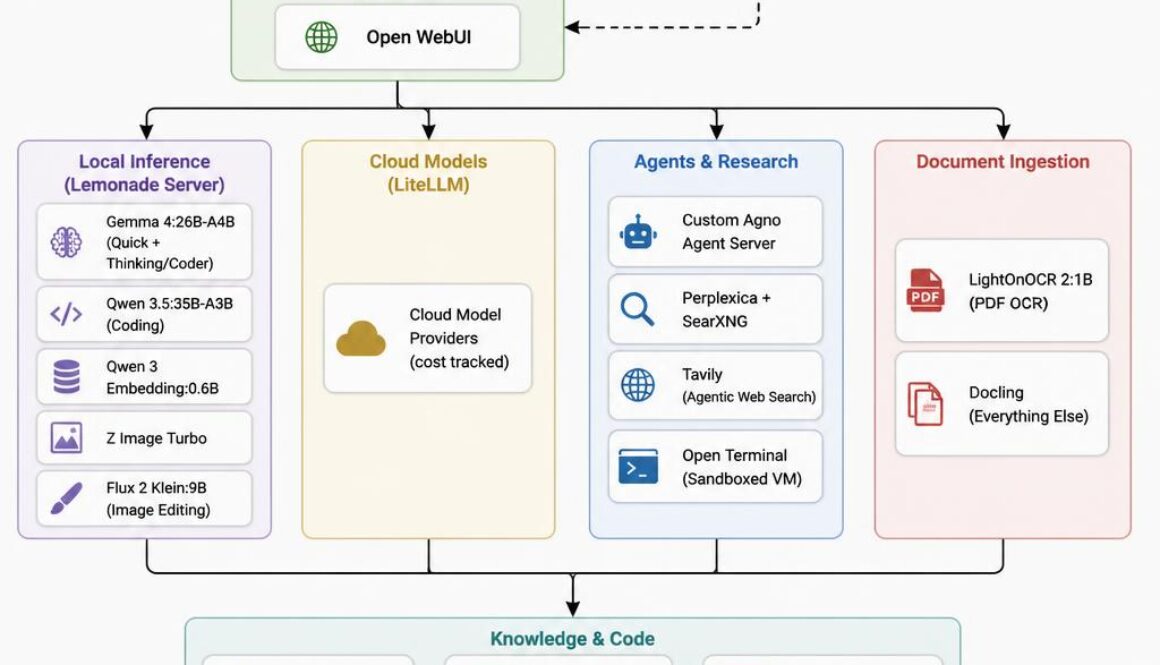
For comparison, here are two diagrams using the same prompt. GPT Image 2:
And here’s what Z Image Turbo made.
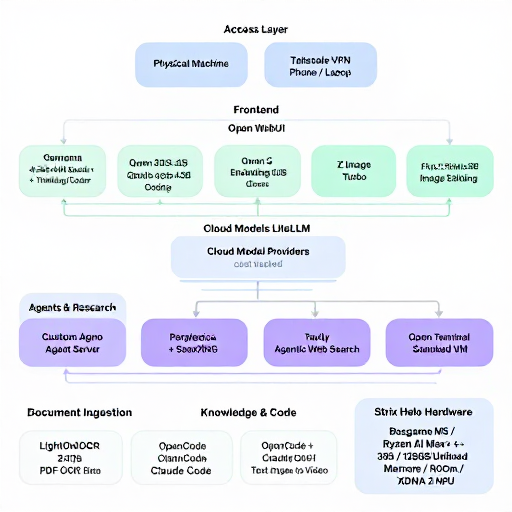
If you need diagrams and infographics and production imagery, the GPT Image 2 reigns supreme. At least as of today.